Replace your spreadsheet and
remember your follow-ups.
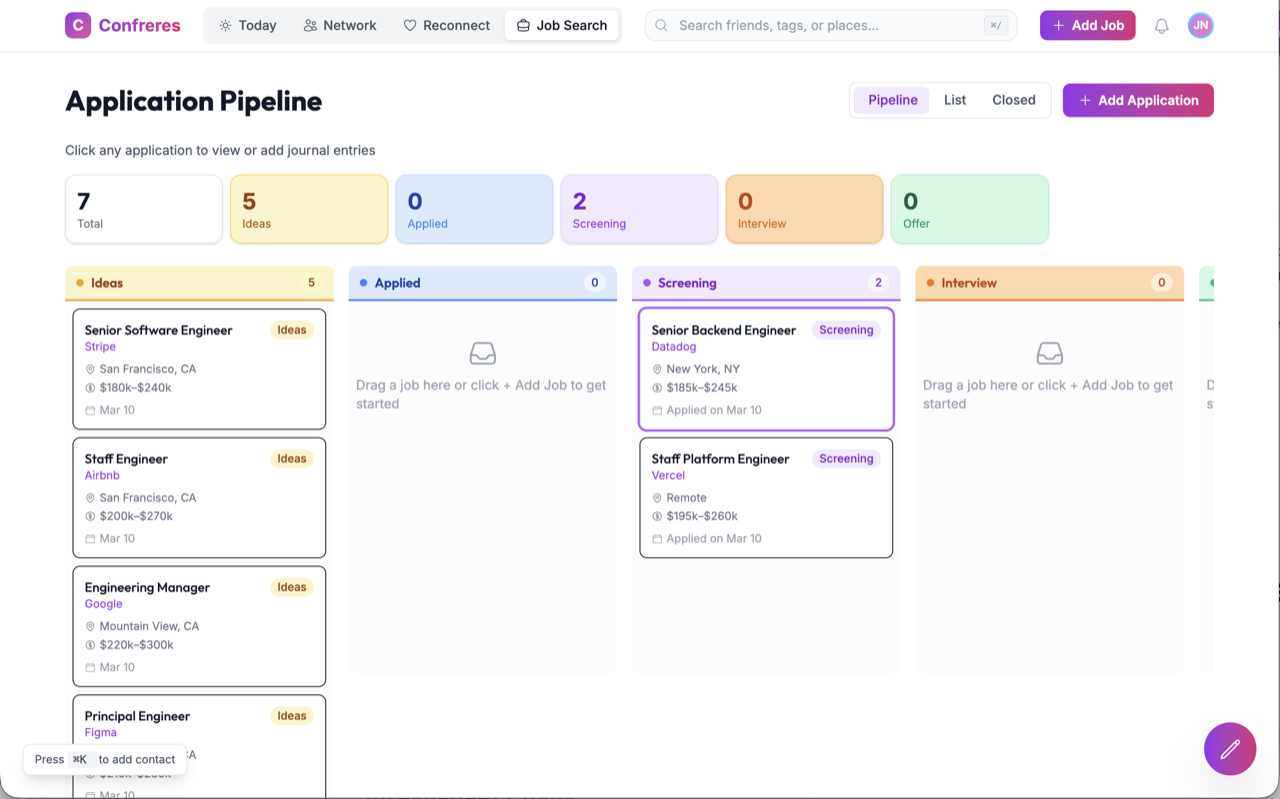
Drag every role across a board that always shows where you stand, log the recruiter and the hiring manager on each application, and let Confreres tell you when it is time to follow up.
What the spreadsheet is actually costing you
A spreadsheet is a fine place to put numbers. It is a terrible place to run a process that depends on timing and on people.
applications.xlsx
- Row 14 still says "Applied" and you applied in February
- No way to tell which of these you have already followed up on
- The recruiter's name is somewhere in your inbox, not in the sheet
- Salary ranges pasted in as text, sortable by nothing
- Interview notes in a doc, the job post in a tab, neither attached to the row
A tracker that keeps up
-
Every role sits in a stage you can see at a glance
-
Reminders tell you what is due instead of waiting to be noticed
-
The people you met live on the application, not in your inbox
-
Salary, location, and source captured as real fields
-
Notes, timeline, and interviewers attached to the role they belong to
Every stage of your search, on one board
Five stages, because that is how a job search actually moves. Drag a role forward and everything attached to it moves with it.
Roles you are considering but have not applied to. Park them here so they stop living in browser tabs.
Submitted and waiting. This is the column where follow-up reminders earn their keep.
Recruiter screen booked or done. Log who you spoke to while you still remember their name.
Onsite loops, take-homes, panels. Track every interviewer so the thank-you note is easy to write.
Compare them side by side against the salary range you recorded on day one.
Organize job applications and track notes, talking points, and comments of people you meet during your interviewing processes. Remember to follow up with reminders and notifications, so you never miss a beat in your job search.
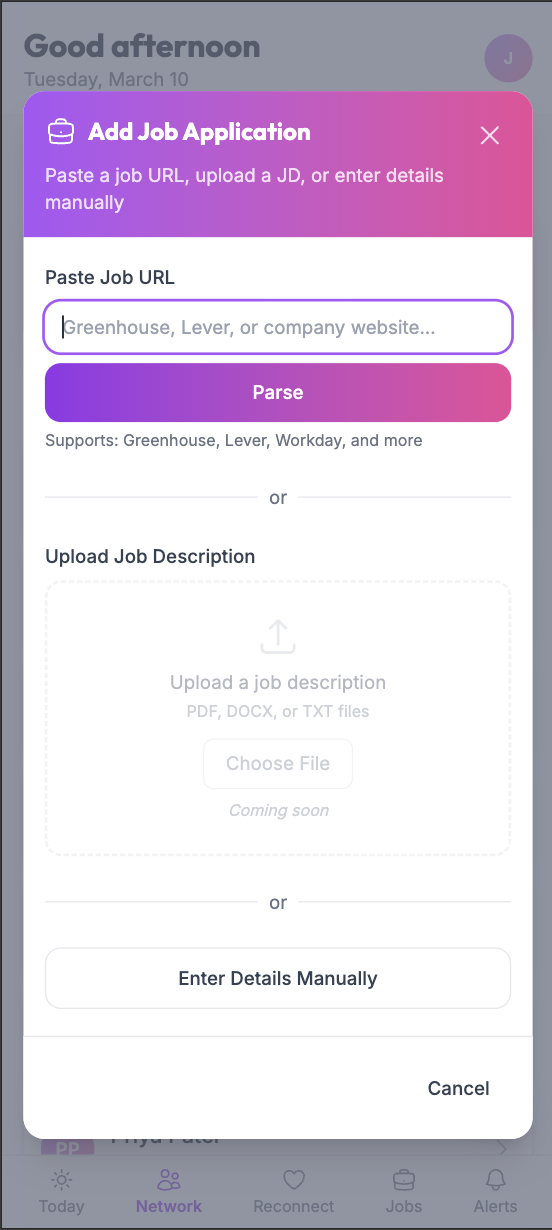
Add a job by pasting the link
The reason most job trackers get abandoned is data entry. Paste the posting URL and Confreres parses the role in for you. Greenhouse, Lever, Workday and company careers pages are all supported, and you can always enter the details manually.
-
The original posting stays linked, so it survives the listing coming down
-
Details land as real fields you can sort and compare, not pasted text
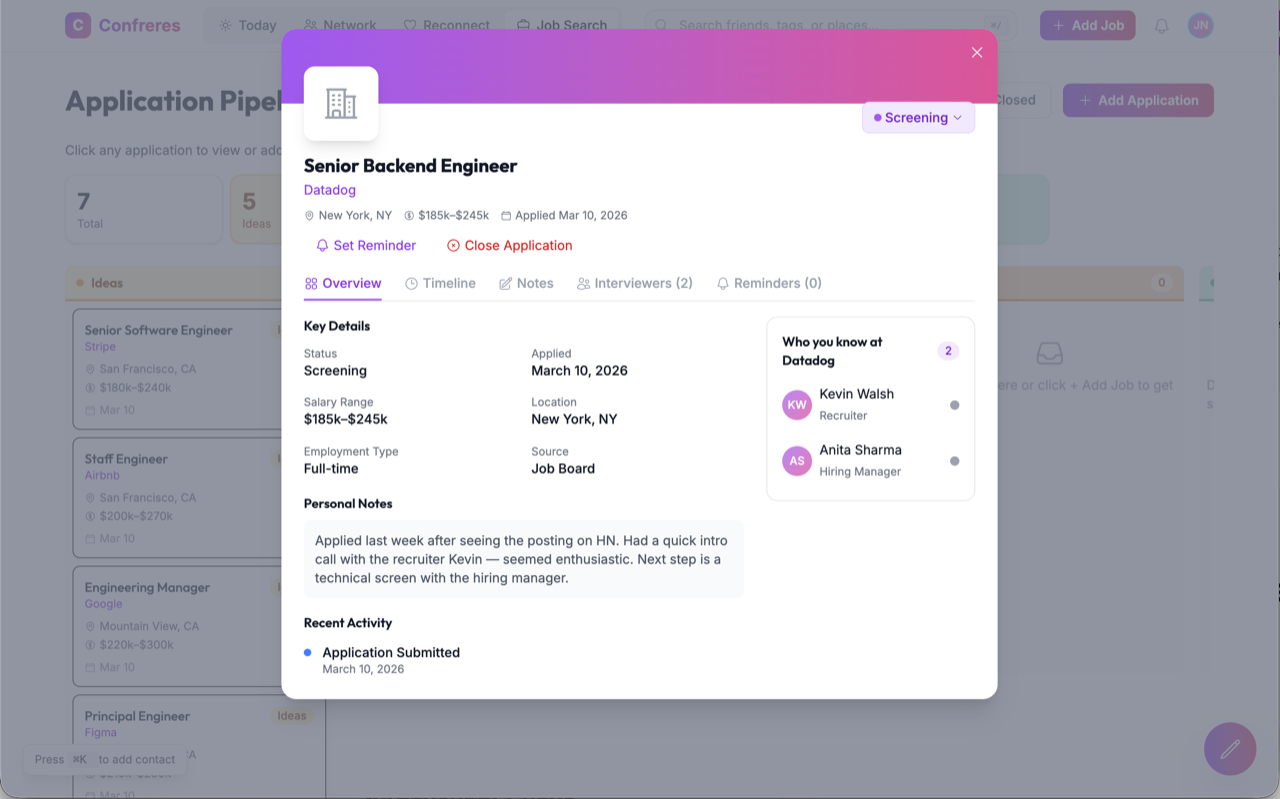
Everything you log, on one application
Open any role and you get five tabs, not one free-text field.
- Overview
- Status, applied date, salary range, location, and where the role came from.
- Timeline
- What happened and when, so a four-week-old conversation is still legible.
- Notes
- The things you would otherwise text yourself. Quick intro call, seemed enthusiastic, next step is a technical screen.
- Interviewers
- Names and titles of everyone you have met on the loop. Log your interactions and interview experiences with them.
- Reminders
- What stops the whole thing from going quiet.
And in the corner, Who you know at this company: the people already in your network who work there.
Never miss a follow-up again
Most applications do not fail at the application. They fail in the silence afterwards, when the polite nudge that would have restarted the conversation never gets sent.
Set a reminder on any application: after you apply, after an interview, before a check-in. It shows up in your notifications with the role attached, and a weekly progress summary recaps what is due so nothing waits on you noticing.
See the full feature list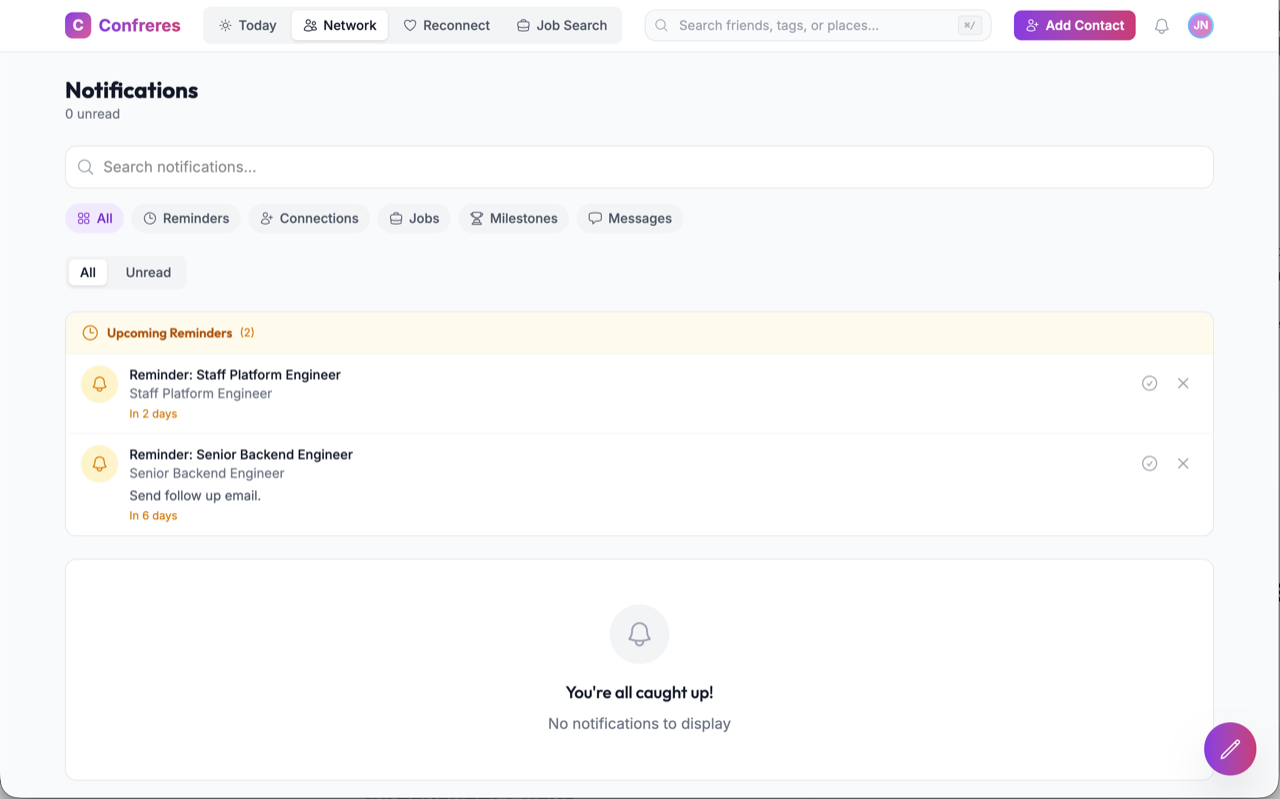
Tracking tells you where you stand. It does not get you seen.
A well-kept tracker is worth having, but it is still a record of applications sitting in queues. Confreres adds the layer that changes the odds: it shows you who in your network can introduce you at the companies already in your pipeline, and drafts the request for you.
One tool, simple pricing, unlimited potential
Start with a 7-day free trial. Cancel anytime before it ends and you won't be charged.
Basic
Everything you need to manage your job search
- Unlimited contacts
- Outreach message drafts
- Interview journal
- Job pipeline tracking
- Request introductions
- Import from LinkedIn & Google
Pro
AI-powered tools to supercharge your search
- Everything in Basic
- AI outreach draft generation
- Smart email suggestions
- Smart calendar suggestions
- AI-powered insights
- Future AI-powered features
Your card will be charged after the 7-day trial ends. Cancel anytime during the trial at no cost.
Job application tracker questions
How do I track job applications without a spreadsheet?
Add each role to a board with five stages, then drag it forward as things move. Every application carries its own notes, interviewers, salary range, and reminders, so nothing depends on a cell you forgot to update.
Can I add a job just by pasting the posting link?
Yes. Paste a URL from Greenhouse, Lever, or a company careers page and Confreres parses the role in for you. You can also enter the details manually.
How do follow-up reminders work?
Set a reminder on any application, after you apply, after an interview, or before a check-in, and it appears in your notifications with the role attached. Weekly progress summaries recap what is due.
Is there a free job application tracker?
Confreres is not free. Every plan starts with a 7-day trial, and Basic is $8 a month billed annually, or $96 a year. Free trackers do exist, and several are listed on our job tracker comparison. We charge because the networking layer behind warm introductions costs real work to run.
Can I track job applications from my phone?
Confreres runs in your browser and the layout adapts to a phone, so you can move an application forward or log a contact from anywhere. There is no separate app to install.
Get the whole search onto one board
Move your open applications over, connect your contacts, and let the reminders do the remembering.
Start your 7-day trial7-day trial, card required. Cancel any time before it ends.